I'm writing this to let people know about a really unique home workout solution: Xbox Fitness.
First, I don't work for Microsoft or Xbox in any way, shape, or form. I am not a game developer. I have no financial stake in this whatsoever. (I work in the television industry.) I'm writing this strictly as a fan, and to share this with others who may be interested but who are unaware of this option.
The short description: imagine having a library of exercise DVDs, but instead of just exercising to them, they are attached to a computer that tracks your movement. The computer will keep track of your workout, calories burned, progress made, and it will correct your mistakes when you have problems with your form.
It also motivates you by awarding points, and -- if you choose to allow the system to share workout info with your friends -- will compare your performance to theirs, as a means of motivation.
So. How's it work?
First, you need the hardware.
You need an Xbox One. (This is not available on any other game console.) You can NOT use the $350 version of the console, you've gotta splurge for the $500 one, because it comes with the Kinnect. The Kinnect is their camera system, with its own built in computer. It looks like this:
http://www.microsoftstore.com/store/msusa/en_US/pdp/Kinect-for-Xbox-One/productID.307499400
If you already have the console, the camera can be purchased separately. $150, according to the link above. Or check Amazon. (Note that this must be the new Kinnect 2.0, not the original for the xbox 360.)
So far you're $500 in, but remember, you also get a new game console / media center, and it's a one-time purchase. Much cheaper than what a gym membership costs for a year.
The camera has a wide angle lens, an infrared camera (to see you in the dark, and to measure your heart rate while exercising), and a built-in microphone.
Once you set up your xbox, the Kinnect sits either directly below or above your TV. You may need to buy a mount of some sort, they usually go for $20 on Amazon.
The Kinnect will allow you to control your console with your voice. You can watch tv and change channels with it, it has built-in Skype, you can pause Netflix movies with your voice, etc.
You also need to subscribe to xbox live gold. This is their online service, and it runs about $60/year for an entire family, though you can find discounts to get it even cheaper. This will unlock all their online services.
Next, you download the Xbox Fitness app from their online store (it's a free download).
And you're ready to go.
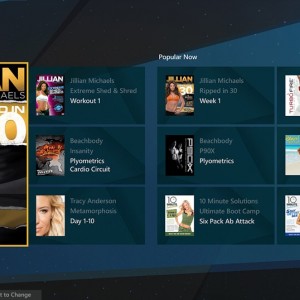
You'll see a bunch of titles. You can see some of the offerings here:
http://www.xbox.com/en-US/xbox-one/games/xbox-fitness
Some titles don't require any additional equipment. Some require weights or bands. The menu screens will let you know what gear is required or optional for each title.
There are several free titles, others you have to pay for. For instance, the first workout of a series is occasionally free, but if you like it and want to unlock the other 3 workouts, it's about the price of a DVD. So $20 or so. Again, these are one-time purchases and they unlock the title for everyone using that xbox.
P90X is $60, but has 5 workouts ranging from 35 - 50 minutes, and this version was done specifically for the xbox. These workouts all have options for isometric work, weights, or bands. The system can track you regardless of which you choose.
The camera will track your movements, and can keep separate profiles for you and other members of your household. (So sorry, your spouse can't do the workout for you. It actually can tell you apart.)
Is the tracking perfect? No. But it is extremely impressive and doesn't miss much.
As for the heart rate, it gives estimates based on skin color and temperature. This isn't mid-workout, mind you. Rather, you have to pause the workout, select the heart rate measurement, and stand still in front of the camera for about 15 seconds.
The system also keeps track of what days you exercised, how many calories you burned, how long you worked out for, etc. You can also share the info with fitness apps on your computer or mobile phone, including windows, android, and yes, the iPhone, too. This is all optional, no requirement to set that up.
And yes, it plays games, too. (And there are 3rd party fitness titles that use the camera for fitness tracking as well.)
That's all. Hope to see some new folks on Xbox Fitness. It's a great way to get your exercise in!
Ps - here is a cool article I just found: